Today i accepted a truth i have been avoiding for 2 weeks now. So Motion Capture is not the way for my creature, Dude Guy Dance Guy to go. I've been thinking this for a while now, and it took seeing my peers animations to fully understand that MoCap was not the way to keep moving.
It is sad, since i have spent almost 2 weeks solid weight painting the smallest details on the character, trying to polish the MoCap into a usable device. Then to finally realize it's not going to work is a defeating feeling. But i will push on :)
Not so bad though, i will now understand how rigging a character start to finish works, and I will figure out IK solvers as well. All of these things i just blew past early on in the course because the MoCap was so much more interesting to me, and it didn't require the knowledge of these steps.
I'm still going to render out a small full 6000 frame MoCap animation of DGDG dancing, but it will be on my own time. I am now embarking in a different direction.
I will still also keep learning about MoCap, and posting it to the blog as part of my side project. Perhaps try again when my animation techniques get a little more polished.
NEW IDEA
As the final project the creature people are going to make a Creature Talent show.
Each person gets at least 20 secs of animation for their character.
800x600 @ 24 fps are the specs
Then they will all be put into one giant file. i think after effects will be used to composite the pieces.
I will have a story board up by next thursday of what i want my characters movements to look like.
I still want to Dude Guy Dance Guy to dance.
Showing posts with label mocap. Show all posts
Showing posts with label mocap. Show all posts
Tuesday, February 23, 2010

Tuesday, February 16, 2010
AudioPhile AKA Dude Guy Dance Guy aka DGDG is almost done
Here is a more up to date version of my character Dude Guy Dance Guy, doing a weird dance move. His arms have some problems still. But he is rocking some fresh new Adidas so he doesn't care.
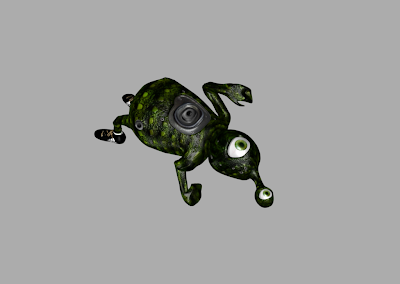
I want to start designing a backdrop for this dance to take place. I am not sure if i want it to be in a city, or on a stage or what. I just don't know at the moment.
I have also been thinking of sounds for this animation. The song i will use will have to have the right tempo to match the dance.
A couple words about MoCap.
Where i left off last time, was just uploading the MoCap to my blender file.
After uploading the c3d file, you give the MoCap a parent child relationship with the mesh. Select the MoCap bones, then the mesh and hit ctr+P. In my case i then made the eyes parent child relationship to the model as well.
Now once i did this my model went nuts.
To correct the problems that have just popped up, Weight painting must be done.
Weight painting is where all of the magic is going to happen. Here is an image of DGDG in a pose, and below is the weight painted version to show what bones are effecting what.
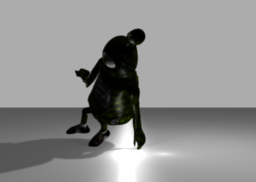

By weight painting the bones of the mesh, you are telling the bones how much to effect each part of the mesh. When i first attached the MoCap to the mesh, the head was stuck in the body and the body was twisted around. Weight painting helped solve those issues.
Spend the majority of your time weight painting the model, IK solvers were not helpful for me, so i didn't bother to use them.

I want to start designing a backdrop for this dance to take place. I am not sure if i want it to be in a city, or on a stage or what. I just don't know at the moment.
I have also been thinking of sounds for this animation. The song i will use will have to have the right tempo to match the dance.
A couple words about MoCap.
Where i left off last time, was just uploading the MoCap to my blender file.
After uploading the c3d file, you give the MoCap a parent child relationship with the mesh. Select the MoCap bones, then the mesh and hit ctr+P. In my case i then made the eyes parent child relationship to the model as well.
Now once i did this my model went nuts.
To correct the problems that have just popped up, Weight painting must be done.
Weight painting is where all of the magic is going to happen. Here is an image of DGDG in a pose, and below is the weight painted version to show what bones are effecting what.


By weight painting the bones of the mesh, you are telling the bones how much to effect each part of the mesh. When i first attached the MoCap to the mesh, the head was stuck in the body and the body was twisted around. Weight painting helped solve those issues.
Spend the majority of your time weight painting the model, IK solvers were not helpful for me, so i didn't bother to use them.
Thursday, February 4, 2010
Motion Capture: An ARTD 471 Side Project
I wanted to upload a small 1-2 sec test animation of the character so far but time is not on my side today. So instead I'll start working on my side project a more in depth look at motion capture.
For my 3D character I decided it would be a fun route, for the animation, to try to incorporate Motion Capture.
To start with
http://mocap.cs.cmu.edu/
This is a really good site with free High Quality Mocap files. Be sure to download the c3d formats if you are using blender.
Motion capture is Readily available online, alot of site charge you but some are free.
These files are huge. A lot of them 120 frames a sec, it will take a bit to load up.
Once it loaded up alt + a to play the animation.
Next step is to attach the armature to the model.
I will be posting, from time to time, more info on this subject. It is a new subject to me, so i will post any interesting articles, sites, and Tutorials i find.
For my 3D character I decided it would be a fun route, for the animation, to try to incorporate Motion Capture.
To start with
http://mocap.cs.cmu.edu/
This is a really good site with free High Quality Mocap files. Be sure to download the c3d formats if you are using blender.
Motion capture is Readily available online, alot of site charge you but some are free.
These files are huge. A lot of them 120 frames a sec, it will take a bit to load up.
Once it loaded up alt + a to play the animation.
Next step is to attach the armature to the model.
I will be posting, from time to time, more info on this subject. It is a new subject to me, so i will post any interesting articles, sites, and Tutorials i find.
Subscribe to:
Posts (Atom)